Unlocking Creative Potential: A Comprehensive Guide to the School and Education Icons Set
In the rapidly evolving landscape of digital design, visual communication has become the cornerstone of effective user engagement. Whether you are a seasoned graphic designer, an educational content creator, or a developer building the next great learning management system, the need for high-quality, versatile visual assets is undeniable. Among the most sought-after resources are specialized icon sets that cater specifically to the academic sector. The Icons Set of School and Education represents more than just a collection of images; it is a vital toolkit designed to bridge the gap between complex educational concepts and intuitive user experiences.
This article explores the significance of this comprehensive icon package, detailing its technical specifications, practical applications, and the profound impact it can have on your digital creative projects. By understanding the value of these assets, you can elevate your work from functional to exceptional.
Understanding the Core Components of the Package
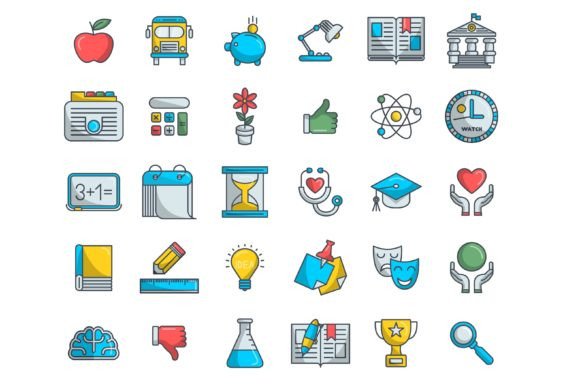
When we discuss a professional-grade icon set, we are not merely talking about simple clip art. The Icons set of school provided in this package is engineered for flexibility and precision. Upon purchase, you receive a single, organized Zip file that serves as your central repository for all visual needs related to education. This archive contains four distinct formats, ensuring compatibility with virtually every software ecosystem used in modern design and development.
- 30 EPS Files: Encapsulated PostScript files are industry standards for print and high-end vector editing. They ensure that your icons remain crisp whether printed on a business card or a large-format banner.
- 30 SVGs: Scalable Vector Graphics are the backbone of modern web design. These code-based images load quickly, scale infinitely without pixelation, and can be manipulated via CSS, making them ideal for responsive websites and mobile applications.
- 30 JPGs: For quick previews, presentations, or platforms that do not support vector formats, high-resolution JPEGs provide immediate usability without the need for conversion.
- Illustrator Vector Format: The source files are provided in Adobe Illustrator format, meaning every line, curve, and color is fully editable. You are not stuck with a static image; you own the raw materials to customize the design to fit your brand identity perfectly.
Why Vector Resizability Matters
One of the most critical features of this set is that the vectors are resizable and fully editable. In traditional raster graphics (like standard photos), enlarging an image results in blurriness or "pixelation." Vectors, however, use mathematical equations to define shapes. This means you can scale an icon of a graduation cap from the size of a favicon (16x16 pixels) to the size of a billboard, and it will retain perfect clarity. For educators and designers working across multiple mediums—from e-books to video lectures—this scalability is indispensable.
The Role of Visual Symbols in Modern Education
Education is no longer confined to the four walls of a classroom. It has expanded into a digital realm encompassing online courses, interactive apps, virtual classrooms, and administrative portals. In this context, icons serve as universal signposts. They reduce cognitive load by allowing users to recognize functions and categories instantly. A pencil icon universally suggests "edit" or "write," while a book icon implies "library" or "reading material."
The Icons Set of School and Education covers a broad spectrum of academic imagery. This includes traditional symbols like apples, chalkboards, and backpacks, as well as modern representations such as laptops, online certificates, and scientific apparatus. By using a cohesive set, you ensure visual consistency throughout your project. Consistency builds trust; when users see a uniform style, they perceive the platform as professional and reliable.
Enhancing User Experience (UX) in EdTech
For developers and UX designers working in the Educational Technology (EdTech) sector, these icons are not just decorative—they are functional. Consider a learning management system (LMS). Users need to navigate between modules, submit assignments, check grades, and contact instructors. Using clear, recognizable icons from this set can streamline navigation menus, making the interface more intuitive for students of all ages and technical abilities.
Furthermore, accessibility is a key concern in modern web design. SVG icons, included in this pack, can be tagged with proper ARIA labels, ensuring that screen readers can interpret them correctly for visually impaired users. This aligns with global standards for inclusive design, making your educational content accessible to a wider audience.
Practical Applications Beyond the Classroom
While the primary focus is education, the utility of this icon set extends far beyond traditional schooling. Here are several ways diverse professionals can leverage these assets:
- Corporate Training and HR: Companies often run internal training programs. Using professional education icons helps distinguish training modules from regular workflow tasks, signaling to employees that this is a dedicated learning space.
- Marketing and Advertising: Agencies promoting tutoring services, summer camps, or educational toys can use these vibrant vectors to create eye-catching social media graphics, brochures, and email newsletters.
- Non-Profit Organizations: Charities focused on literacy or school supplies can use these icons in their fundraising campaigns to clearly communicate their mission and impact.
- App Development: From language learning apps to coding bootcamps, developers can integrate these SVGs directly into their codebases, reducing load times and improving app performance.
Customization and Creative Freedom
A common misconception among beginners is that stock icons limit creativity. However, because this set is provided in Illustrator vector format, it offers immense creative freedom. You are not forced to use the icons as-is. You can change colors to match your brand palette, adjust stroke weights for a bolder look, or combine elements to create unique composite illustrations.
For example, if your educational brand uses a specific shade of blue and orange, you can open the EPS or AI file, select the vector paths, and apply your exact hex codes. This level of customization ensures that your visual identity remains unique, even when using pre-made assets. It allows small businesses and independent creators to achieve a polished, custom-designed look without the prohibitive cost of hiring an illustrator for every single asset.
Bridging the Gap Between Aesthetics and Function
In digital creative projects, there is often a tension between making things look good and making them work well. This icon set resolves that tension. The designs are clean and minimalistic, adhering to modern flat design principles that favor clarity over clutter. This aesthetic choice is not arbitrary; it ensures that the icons remain legible even at small sizes on mobile devices. By prioritizing both form and function, the set supports a seamless user journey.
Getting Started: Tips for Integration
To make the most of your Icons set of school, consider the following best practices:
- Organize Your Assets: Unzip the file immediately and organize the folders by format (EPS, SVG, JPG). This saves time during the design process.
- Test Scalability: Before finalizing your design, test the SVGs at various sizes to ensure they remain clear and recognizable.
- Maintain Consistency: If you modify one icon’s style (e.g., rounding the corners), apply the same modification to all icons in the set to maintain visual harmony.
- Optimize for Web: When using SVGs on the web, consider minifying the code to improve page load speeds, enhancing the overall performance of your site.
Conclusion
The Icons Set of School and Education is more than a download; it is an investment in the quality and professionalism of your digital projects. By providing 30 EPS, 30 SVGs, 30 JPGs, and fully editable Illustrator vectors, this package offers the versatility needed to tackle any creative challenge. Whether you are building an e-learning platform, designing marketing materials, or creating corporate training modules, these icons provide the visual language necessary to communicate effectively.
In a world where attention spans are short and visual clarity is paramount, having the right tools makes all the difference. Embrace the flexibility, enjoy the creative control, and let these icons help you tell your educational story with precision and style. Happy creating, and may your designs inspire the next generation of learners.